DE10-Nano: HPS USB 2.0 HID analog gamepad example
Description
An example that enumerates as a gamepad with analog 3-axis rotation and 6 buttons. Since the DE10-Nano board contains an accelerometer the x, y and z raw sample results is scaled and mapped to the 3-axis rotation of the gamepad.
The prebuilt sdcard image for this example is: usbdemo_hid_gamepad1.sd.img
Control Panel\Hardware and Sound\Devices and Printers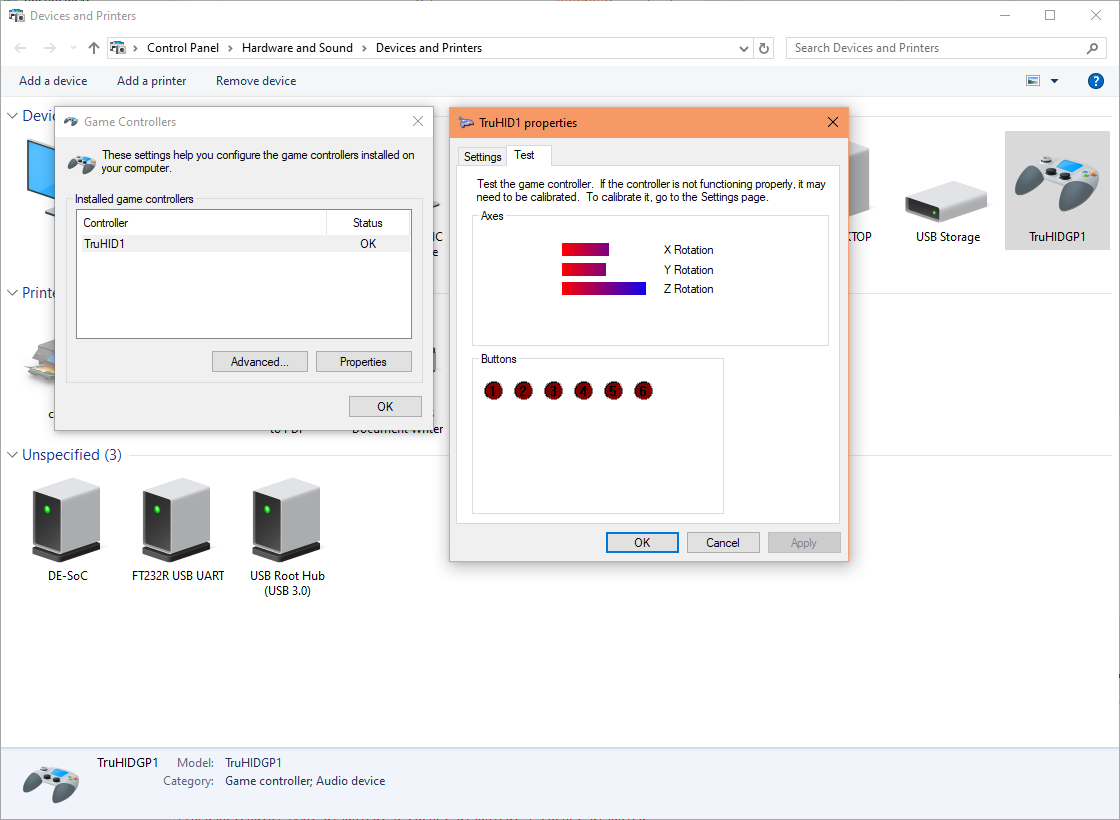
Enumerated as TruHIDGP1. Tilting the DE10-Nano board will change the rotation bars in the Windows "Game controller settings" gamepad test.
Source code guide
1. Initialisation
When the example starts, it goes through some initialisations. The first gamepad device initialisation is the hid_gamepad1_init_app() function below.
tru_usb_device/c5soc/hid_gamepad1_c5soc.c
                            void hid_gamepad1_init_app(void){

                              setup_adxl345();

                              tru_adxl345_res = tru_adxl345_determine_res(OPT_ADXL345_RANGE, OPT_ADXL345_FULLRES);


                              tru_dwc2_phy_t phy = {

                                .speed = TRU_DWC2_PHYSPEED_HS,

                                .iftype = TRU_DWC2_PHYIFTYPE_INTERNAL,

                                .rate = TRU_DWC2_PHYRATE_SDR,

                                .width = TRU_DWC2_PHYWIDTH_8BIT

                              };


                              hid_gamepad1_init(

                                &pc,

                                &hid,

                                TRU_USB_U1_BASE,

                                phy,

                                TRU_DWC2_DCFG_DEVSPD_USBHS20,

                                true,

                                false,

                                HID_GAMEPAD1_DMA_MODE_CHOICE

                              );


                              tru_usb_pc_start(&pc);

                            }
This file contains hardware (application layer) specific initialisation code. The macro TRU_USB_U1_BASE selects USB controller 1, for USB controller 0 you would change that to TRU_USB_U0_BASE. The macro TRU_DWC2_DCFG_DEVSPD_USBHS20 selects enumeration to highest speed, if you want to limit to full-speed then change this to TRU_DWC2_DCFG_DEVSPD_USBFS20. The accelerometer sensor is initialised here and then calls the init function from the common (library layer) hid gamepad 1 file (see 3. Common callbacks).
2. USB interrupt handler
When you connect the DE10-Nano's USB OTG to the host computer, USB controller 1 will generate interrupts which is processed by the ISR handler below. You do not need to do anything in this file because callbacks are automatically called (if registered), and those are the functions that you would normally work with.
usb/synopsys/tru_dwc2_otg1_isr.c
tru_dwc2_otg1_isr()
This interrupt handler function is used because the DE10-Nano's OTG usb connector is wired to USB controller 1.
3. Common callbacks
All common callbacks are placed in the generic (library layer) file below.
tru_usb_device/common/hid_gamepad1.c
                            void hid_gamepad1_init(

                              tru_usb_pc_t *pc,

                              tru_usb_hid_t *hid,

                              uintptr_t usb_base_addr,

                              tru_dwc2_phy_t phy,

                              uint8_t speed_sel,

                              bool otg_id_pin_supported,

                              bool enable_sof_trigger,

                              tru_dwc2_dma_mode_t dma_mode

                            ){

                              tru_usb_pc_init(

                              pc,

                              get_hid_gamepad1_pd_info()->pd,

                              usb_base_addr,

                              phy,

                              speed_sel,

                              otg_id_pin_supported,

                              enable_sof_trigger,

                              dma_mode,

                              1

                            );


                              tru_usb_hid_init(hid, pc, get_hid_gamepad1_pd_info());


                              // Register callback functions

                              tru_usb_hid_register_cb_reset(hid, cb_reset);

                              tru_usb_hid_register_cb_enumdone(hid, cb_enumdone);

                              tru_usb_hid_register_cb_setup(hid, cb_setup);

                              tru_usb_hid_register_cb_set_report(hid, cb_set_report);

                              tru_usb_hid_register_cb_cfg_act(hid, cb_config);

                              tru_usb_hid_register_cb_epo_act(hid, HID_GAMEPAD1_REPORT_EPNUM, cb_output_report_act);

                              tru_usb_hid_register_cb_epi_act(hid, HID_GAMEPAD1_REPORT_EPNUM, cb_input_report_act);

                              tru_usb_hid_register_cb_epo_compl(hid, HID_GAMEPAD1_REPORT_EPNUM, cb_output_report_compl);

                              tru_usb_hid_register_cb_epi_compl(hid, HID_GAMEPAD1_REPORT_EPNUM, cb_input_report_compl);

                            }
This function initialises the HID class and also registers some callbacks.
4. Registration of activated endpoint callback
An important callback is when the endpoint (EP) is activated, these are registered in the hid_gamepad1_init() function below.
tru_usb_device/common/hid_gamepad1.c
                              tru_usb_hid_register_cb_epo_act(hid, HID_GAMEPAD1_OUT_REPORT_EPNUM, cb_output_report_act);

                              tru_usb_hid_register_cb_epi_act(hid, HID_GAMEPAD1_IN_REPORT_EPNUM, cb_input_report_act);
The function cb_output_report_act() is registered as the activated out EP callback for output reports, and the cb_input_report_act() as the activated in EP callback for input reports. Both of these are called when the endpoint is activated or deactivated. This gamepad does not make use of any output reports from the host so the cb_output_report_act() is empty but is registered to show how it is done.
5. Activated endpoint callback
Currently, my library is interrupt driven and polling is not yet supported. When an endpoint becomes active or inactive via the SET_CONFIG or SET_INTERFACE setup requests from the host, the registered callback is executed. Typically you would put the receive or transmit code into these callbacks
tru_usb_device/common/hid_gamepad1.c
                            void cb_input_report_act(tru_usb_hid_t *hid, tru_usb_pc_epi_t *ep, bool is_activated){

                              if(is_activated){

                                hid_gamepad1_transmit_report(hid, ep);

                              }

                            }
In this example, as soon as the endpoint is activated we want to transmit an updated input report.
Please note, transfers are started by the host, the transmit/receive only primes the USB hardware controller to get ready to transfer - it now waits for the host for an IN or OUT token packet before transfer actually starts.
tru_usb_device/common/hid_gamepad1.c
                            void hid_gamepad1_transmit_report(tru_usb_hid_t *hid, tru_usb_pc_epi_t *ep){

                              // ========================

                              // Transmit an input report

                              // ========================


                              tru_usb_hid_report_info_t *input_report_info = tru_hid_get_next_input_report_info(ep, hid->pc->dma_mode);  // Get the next input report.  Ensure this is executed only once per transmit


                              // Update the report

                              switch(input_report_info->id){

                                case HID_GAMEPAD1_INPUT_REPORT_ID:

                                  hid_gamepad1_update_controller((tru_hid_gamepad1_input_report_t *)input_report_info->report);

                                  break;

                                default:

                              }


                              tru_usb_pc_transmit(hid->pc, ep->num, input_report_info->size, input_report_info->size);

                            }
HID devices can have multiple input reports (device to host) but we can only transmit one input report at a time so the library keeps track of the current input report. An internal array index is incremented each time we call the tru_hid_get_next_input_report_info() function, which cycles through the input reports and also set the report buffer as the endpont transfer buffer. Note that the HID gamepad1 demo contains only one input report.
This source is at generic library layer so the report update code cannot exist here because we need hardware specific code, instead a weak callback function hid_gamepad1_update_controller() is created for the upper layer code to override which can then update the input report.
6. Application layer update input report
The update code is in the application layer source file below.
tru_usb_device/c5soc/hid_gamepad1_c5soc.c
                            // Override weak function

                            void hid_gamepad1_update_controller(tru_hid_gamepad1_input_report_t *report){

                              update_adxl345_sample();


                              int16_t x;

                              int16_t y;

                              int16_t z;


                              report->buttons.val = 0;


                            #if HID_GAMEPAD1_POS_RES

                              // Convert sample resolution to HID resolution

                              if(HID_GAMEPAD1_POS_RES > tru_adxl345_res){

                                uint32_t shift = HID_GAMEPAD1_POS_RES - tru_adxl345_res + 1;  // multiplier

                                x = (accel.sample.x > 0) ? accel.sample.x << shift : (accel.sample.x + 1) << shift - 1;

                                y = (accel.sample.y > 0) ? accel.sample.y << shift : (accel.sample.y + 1) << shift - 1;

                                z = (accel.sample.z > 0) ? accel.sample.z << shift : (accel.sample.z + 1) << shift - 1;

                              }else if(HID_GAMEPAD1_POS_RES < tru_adxl345_res){

                                uint32_t shift = tru_adxl345_res - HID_GAMEPAD1_POS_RES + 1;  // divider

                                x = (accel.sample.x > 0) ? accel.sample.x >> shift : accel.sample.x >> shift;

                                y = (accel.sample.y > 0) ? accel.sample.y >> shift : accel.sample.y >> shift;

                                z = (accel.sample.z > 0) ? accel.sample.z >> shift : accel.sample.z >> shift;

                              }


                              report->x = x;

                              report->y = y;

                              report->z = z;

                            #endif


                            #if HID_GAMEPAD1_ROT_RES

                              // Convert sample resolution to HID resolution

                              if(HID_GAMEPAD1_ROT_RES > tru_adxl345_res){

                                uint32_t shift = HID_GAMEPAD1_ROT_RES - tru_adxl345_res + 1;  // multiplier

                                x = (accel.sample.x > 0) ? accel.sample.x << shift : (accel.sample.x + 1) << shift - 1;

                                y = (accel.sample.y > 0) ? accel.sample.y << shift : (accel.sample.y + 1) << shift - 1;

                                z = (accel.sample.z > 0) ? accel.sample.z << shift : (accel.sample.z + 1) << shift - 1;

                              }else if(HID_GAMEPAD1_ROT_RES < tru_adxl345_res){

                                uint32_t shift = tru_adxl345_res - HID_GAMEPAD1_ROT_RES + 1;  // divider

                                x = (accel.sample.x > 0) ? accel.sample.x >> shift : accel.sample.x >> shift;

                                y = (accel.sample.y > 0) ? accel.sample.y >> shift : accel.sample.y >> shift;

                                z = (accel.sample.z > 0) ? accel.sample.z >> shift : accel.sample.z >> shift;

                              }


                              report->rx = x;

                              report->ry = y;

                              report->rz = z;

                            #endif

                            }
7. Transfer complete endpoint callback
Whenever a transmission completes the registered transfer complete callback is automatically executed. Here, we want to transmit the next input report.
tru_usb_device/common/hid_gamepad1.c
                            void cb_input_report_compl(tru_usb_hid_t *hid, tru_usb_pc_epi_t *ep){

                              hid_gamepad1_transmit_report(hid, ep);

                            }
Document date: Rev 1: 24 Jul 2026