DE10-Nano: HPS USB 2.0 CDC-ACM examples
CDC-ACM example
In this example the HPS will enumerate as a USB standard asynchronous serial port device. Initially, the example only enabled data reception and simply discards the data, enabling maximum throughput to be tested using host software. Later, data transmission was added to echo any data received. This is optionally enabled through the CDCACM_ECHO macro located in "usb_examples/device/cdcacm.h".
Standard serial I/O is designed for asynchronous stream, intended for transfers which can be consumed in time with no control flow, i.e. before the serial driver buffer overflows. On overflow the extra data is discarded and naturally not passed on to the application. There are issues (described later) with the USB serial driver on Windows and Linux which prevents high transfer throughput (without losing data) when transmitting and receiving on the device side.
Device Manager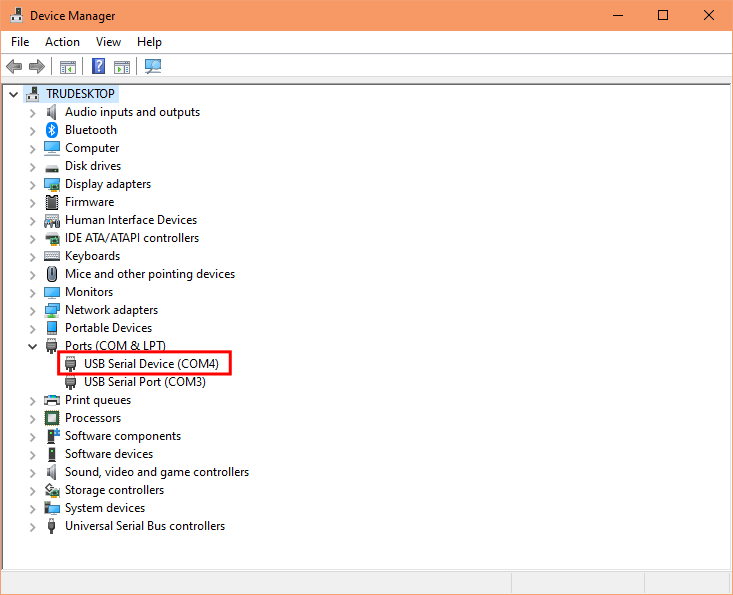
To test the demo you may run the provided host application. Note, you need to edit the env-win.bat or env-linux.sh file with the serial port that was enumerated on your PC.
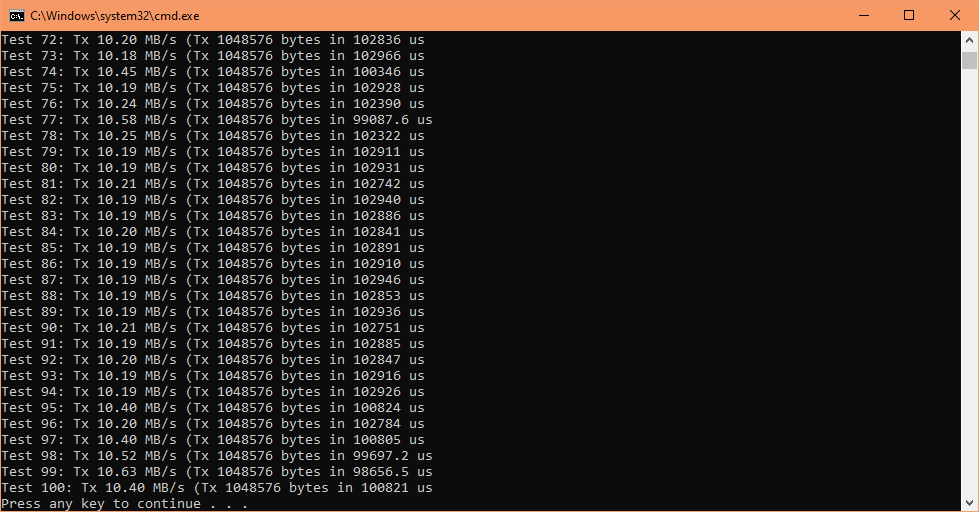
SD card image: tru_usb_cdcacm.sd.imgHost app: prebuilt_hostapps\c++\cdcacm\test_1048576.bat
SD card image: tru_usb_cdcacm_echo.sd.img
Host app: prebuilt_hostapps\c++\cdcacm\test_echo_512.bat
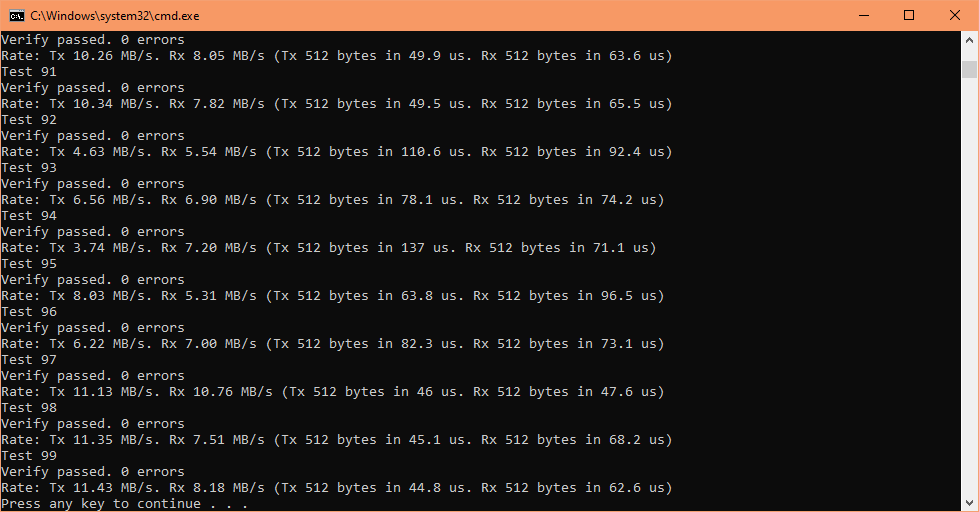
Note, the echo demo can only work per transmit of maximum 512 bytes transfer length, if you send a longer length some data will be discarded then host application may hang or timeout.
The USB ZLP
ZLP is a specific packet which has zero data payload for ending a transmission, known as Zero Length Packet and is one of the problem in Windows serial driver (usbser.sys). Let's look at the USB 2.0 specification. In bulk data flow, the packet size defines these constraints (quoting from the USB 2.0 spec pdf):
A bulk transfer is complete when the endpoint does one of the following:
- Has transferred exactly the amount of data expected
- Transfers a packet with a payload size less than wMaxPacketSize or transfers a zero-length packet
This means we send a ZLP when the transferred size is less than the amount of data expected and the packet sent equals the maximum packet size.
Windows & Linux CDC-ACM serial driver problems
There are a lot of misinformation on the internet regarding Windows USB serial driver problems and I believe my own findings below are the true reasons. Unfortunately the workarounds below produce slow transfers but they eliminate data loss.
Problem 1: (Device transmit):
On Windows, the host does not want a ZLP when we transfer data of length that is multiple of 4096 bytes, but because this is a multiple of the MPS (Maximum Packet Size) a ZLP should be sent to end the transmission. Sending a ZLP to the host will cause this device to hang because it stays waiting for the transfer complete interrupt, which will never happen because Windows does not send the EP OUT token to accept the ZLP. Depending on your GetCommTimeouts() and SetCommTimeouts() settings (Win32 API functions), Windows host application will:
- timed out, then you lose data
- wait forever until a ZLP or more data is received, no data loss
Windows USB serial driver (usbser.sys) always schedules URB requests (driver to kernel requests) with 4096 bytes so it expects to receive 4K chunks, but because our transfer is a stream consisting of multiple packets, the expected length will be our total transfer size rounded up to the nearest 4096 bytes.
Workaround: Don't send a ZLP on transfers that are a multiple of 4K. This problem is not on Linux but it tolerates this workaround.
Problem 2: (Device transmit):
On Linux and Windows. The default driver will discard overflowed data if the serial port is opened and we transmit too early or if the host application is not able to consume the stream fast enough. In bidirectional mode when we receive and transmit at the same time we will be transmitting too early (host hasn't even started a read), and if we send more than one USB MPS packet some packets are discarded by the host driver. The host application read function will still be waiting for those discarded packets because it has no idea the driver discarded some! This does not seem to be an issue when operating in unidirectional mode, perhaps because the host shortly starts a read and is able to consume in time, this is demonstrated by my request-response demo. This issue is time and buffer sensitive, which lead to reports that is working for some but not for others, simply because users are using different serial configurations and transfer sizes.
Workaround: For bidirectional mode:
- in high-speed send only a maximum of 512 bytes for each host read
- in full-speed send only a maximum of 64 bytes for each host read
- in low-speed bulk mode is not supported
Problem 3: (Device receive):
On Linux and Windows, the host does not send a ZLP when the transfer is multiple of the MPS (perhaps host never sends ZLP?). When the device receives a transfer that is multiple of the MPS we expect the host to send a ZLP as required by USB spec but no ZLP is sent. This causes the device to hang because it is waiting for a transfer complete interrupt on the ZLP.
Workaround: Limit the EP transfer size to the MPS, which creates a transfer complete interrupt on every received transfer. This works because the transfer is now always a short transfer or is exactly the expected transfer size so we will never expect to wait for a ZLP.
Acronyms: ZLP = Zero Length Packet, EP = EndPoint, MPS = Maximum Packet Size
CDC-ACM RR (Request-Response) example
In this second example the HPS will enumerate to a USB standard asynchronous serial port device, but here we use a custom request-response structure format so that we can temporarily disable a workaround, which allows for faster throughput without data loss.
prebuilt_hostapps\c++\cdcacm_rr\test_1048576.bat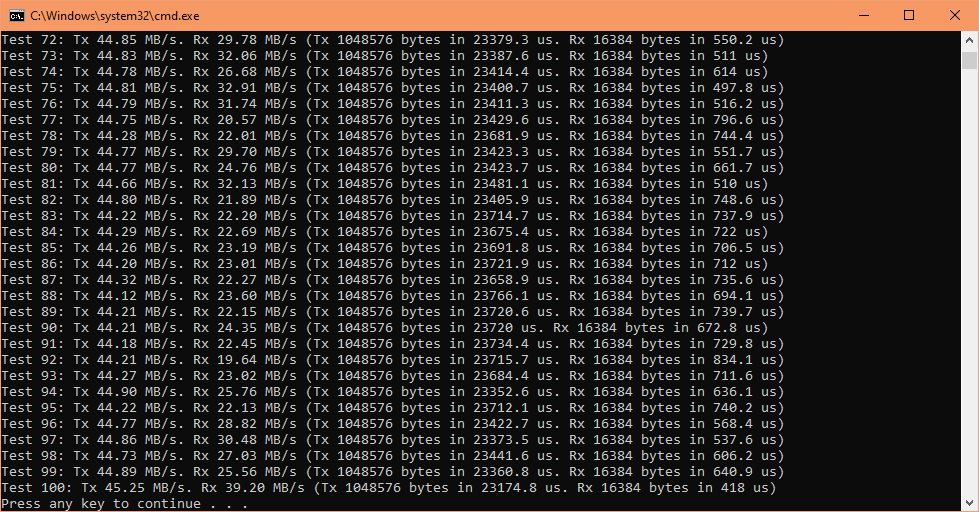
Throughput is a lot faster with a request-response which provides the data length and allow for temporary disable of a driver workaround.
Source code guide
1. Initialisation
The first CDC-ACM device initialisation is the cdcacm_init_app() function below.
tru_usb_device/c5soc/cdcacm_c5soc.c
                              void cdcacm_init_app(void){

                                tru_dwc2_phy_t phy = {

                                  .speed = TRU_DWC2_PHYSPEED_HS,

                                  .iftype = TRU_DWC2_PHYIFTYPE_INTERNAL,

                                  .rate = TRU_DWC2_PHYRATE_SDR,

                                  .width = TRU_DWC2_PHYWIDTH_8BIT

                                };


                                cdcacm_init(

                                  &pc,

                                  &cdc,

                                  TRU_USB_U1_BASE,

                                  phy,

                                  TRU_DWC2_DCFG_DEVSPD_USBHS20,

                                  true,

                                  false,

                                  HID_CUS_DMA_MODE_CHOICE

                                );


                                tru_usb_pc_start(&pc);

                              }
This file contains hardware (application layer) specific initialisation code. The macro TRU_USB_U1_BASE selects USB controller 1, for USB controller 0 you would change that to TRU_USB_U0_BASE. The macro TRU_DWC2_DCFG_DEVSPD_USBHS20 selects enumeration to highest speed, if you want to limit to full-speed then change this to TRU_DWC2_DCFG_DEVSPD_USBFS20.
2. USB interrupt handler
When you connect the DE10-Nano's USB OTG to the host computer, USB controller 1 will generate interrupts which is processed by the ISR handler below. You do not need to do anything in this file because callbacks are automatically called (if registered), and those are the functions that you would normally work with.
usb/synopsys/tru_dwc2_otg1_isr.c
tru_dwc2_otg1_isr()
This interrupt handler function is used because the DE10-Nano's OTG usb connector is wired to USB controller 1.
3. Common callbacks
All common callbacks are placed in the generic (library layer) file.
tru_usb_device/common/cdcacm.c
                            void cdcacm_init(

                              tru_usb_pc_t *pc,

                              tru_usb_cdc_t *cdc,

                              uintptr_t usb_base_addr,

                              tru_dwc2_phy_t phy,

                              uint8_t speed_sel,

                              bool otg_id_pin_supported,

                              bool enable_sof_trigger,

                              tru_dwc2_dma_mode_t dma_mode

                            ){

                              tru_usb_pc_init(

                                pc,

                                get_cdcacm_pd_info()->pd,

                                usb_base_addr,

                                phy,

                                speed_sel,

                                otg_id_pin_supported,

                                enable_sof_trigger,

                                dma_mode,

                                1

                              );

                              tru_usb_cdc_init(cdc, pc, get_cdcacm_pd_info());


                              cdcacm_cb_setup_buffers();


                              ntf_ep = &pc->eps.epis[CDCACM_NTF_EPNUM];

                              txd_ep = &pc->eps.epis[CDCACM_TXD_EPNUM];

                              rxd_ep = &pc->eps.epos[CDCACM_RXD_EPNUM];


                              // Register callback functions

                              tru_usb_cdc_register_cb_reset(cdc, cb_reset);

                              tru_usb_cdc_register_cb_enumdone(cdc, cb_enumdone);

                              tru_usb_cdc_register_cb_epi_act(cdc, CDCACM_NTF_EPNUM, cb_ntf_act);

                              tru_usb_cdc_register_cb_epo_act(cdc, CDCACM_RXD_EPNUM, cb_rxd_act);

                              tru_usb_cdc_register_cb_epi_act(cdc, CDCACM_TXD_EPNUM, cb_txd_act);

                              tru_usb_cdc_register_cb_epi_chunk(cdc, CDCACM_NTF_EPNUM, cb_ntf_chunk);

                              tru_usb_cdc_register_cb_epi_compl(cdc, CDCACM_NTF_EPNUM, cb_ntf_compl);

                              tru_usb_cdc_register_cb_epo_chunk(cdc, CDCACM_RXD_EPNUM, cb_rxd_chunk);

                              tru_usb_cdc_register_cb_epo_compl(cdc, CDCACM_RXD_EPNUM, cb_rxd_compl);

                              tru_usb_cdc_register_cb_epi_chunk(cdc, CDCACM_TXD_EPNUM, cb_txd_chunk);

                              tru_usb_cdc_register_cb_epi_compl(cdc, CDCACM_TXD_EPNUM, cb_txd_compl);

                              tru_usb_cdc_register_cb_setlinecontrol(cdc, cb_setlinecontrol);

                              tru_usb_cdc_register_cb_sendbreak(cdc, cb_sendbreak);

                            }
This function initialises the CDC class and also registers some callbacks. In this demo we must create endpoint transfer buffers, however the size is determined by the hardware's available memory which is at the application layer, so a weak callback cdcacm_cb_setup_buffers() function is called here for the upper layer to create them.
4. Endpoint transfer buffers
tru_usb_device/c5soc/cdcacm_c5soc.c
                            // Transfer buffers for chunk transfers

                            #if defined(CDCACM_DMA_MODE_CHOICE) && CDCACM_DMA_MODE_CHOICE == _TRU_DWC2_DMA_MODE_SG

                              NONCACHEABLE_SECTION static uint8_t ntf_buffer[16];

                              NONCACHEABLE_SECTION static uint8_t txd_buffer[CDCACM_SG_NUM_TXBUF][32768];

                              NONCACHEABLE_SECTION static uint8_t rxd_buffer[CDCACM_SG_NUM_RXBUF][32768];

                              NONCACHEABLE_SECTION static tru_dwc2_dev_sgdma_desc_reg_t ntf_dma_descs[1];

                              NONCACHEABLE_SECTION static tru_dwc2_dev_sgdma_desc_reg_t txd_dma_descs[CDCACM_SG_NUM_TXBUF];

                              NONCACHEABLE_SECTION static tru_dwc2_dev_sgdma_desc_reg_t rxd_dma_descs[CDCACM_SG_NUM_RXBUF];

                            #else

                              NONCACHEABLE_SECTION static uint8_t ntf_buffer[16];

                              NONCACHEABLE_SECTION static uint8_t txd_buffer[65536];

                              NONCACHEABLE_SECTION static uint8_t rxd_buffer[65536];

                            #endif


                            // Override weak function

                            void cdcacm_cb_setup_buffers(void){

                              tru_usb_pc_epi_t *ntf_ep = &pc.eps.epis[CDCACM_NTF_EPNUM];

                              tru_usb_pc_epi_t *txd_ep = &pc.eps.epis[CDCACM_TXD_EPNUM];

                              tru_usb_pc_epo_t *rxd_ep = &pc.eps.epos[CDCACM_RXD_EPNUM];


                              #if defined(CDCACM_DMA_MODE_CHOICE) && CDCACM_DMA_MODE_CHOICE == _TRU_DWC2_DMA_MODE_SG

                                // Register transfer buffers

                                tru_usb_lxfer_register_buffer(&ntf_ep->lxfer, ntf_buffer, sizeof(ntf_buffer));

                                for(uint32_t i = 0; i < CDCACM_SG_NUM_TXBUF; i++){

                                  tru_usb_lxfer_register_buffer(&txd_ep->lxfer, txd_buffer[i], sizeof(txd_buffer[i]));

                                }

                                for(uint32_t i = 0; i < CDCACM_SG_NUM_RXBUF; i++){

                                  tru_usb_lxfer_register_buffer(&rxd_ep->lxfer, rxd_buffer[i], sizeof(rxd_buffer[i]));

                                }

                                // Register SG DMA descriptor lists

                                tru_usb_lxfer_register_sgdma_descs(&ntf_ep->lxfer, ntf_dma_descs, sizeof(ntf_dma_descs) / sizeof(tru_dwc2_dev_sgdma_desc_reg_t));

                                tru_usb_lxfer_register_sgdma_descs(&txd_ep->lxfer, txd_dma_descs, sizeof(txd_dma_descs) / sizeof(tru_dwc2_dev_sgdma_desc_reg_t));

                                tru_usb_lxfer_register_sgdma_descs(&rxd_ep->lxfer, rxd_dma_descs, sizeof(rxd_dma_descs) / sizeof(tru_dwc2_dev_sgdma_desc_reg_t));

                              #else

                                tru_usb_lxfer_register_buffer(&ntf_ep->lxfer, ntf_buffer, sizeof(ntf_buffer));

                                tru_usb_lxfer_register_buffer(&txd_ep->lxfer, txd_buffer, sizeof(txd_buffer));

                                tru_usb_lxfer_register_buffer(&rxd_ep->lxfer, rxd_buffer, sizeof(rxd_buffer));

                              #endif

                            }
Buffers are created here. The control setup endpoints in EP0 and out EP0 buffers are predefined by the library so those are excluded. The CDC-ACM device class requires 3 endpoints buffers to be defined, these are for serial notification messages, serial data transmit and serial data receive. The Cyclone V SoC has a lot of memory (1GB) so generous sizes can be given. The buffer code is a little bit more complicated with conditional macros to support the Scatter Gather DMA mode buffers.
5. Registration of activated endpoint callback
An important callback is when the endpoint (EP) is activated, these are registered in the hid_gamepad1_init() function below.
tru_usb_device/common/cdcacm.c
                              tru_usb_cdc_register_cb_epo_act(cdc, CDCACM_RXD_EPNUM, cb_rxd_act);

                              tru_usb_cdc_register_cb_epi_act(cdc, CDCACM_TXD_EPNUM, cb_txd_act);
The function cb_rxd_act() is registered as the activated out EP callback (device to host), and the cb_txd_act() as the activated in EP callback (host to device). Both of these are called when the endpoint is activated or deactivated.
6. Activated endpoint callback
When an endpoint becomes active or inactive via the SET_CONFIG or SET_INTERFACE setup requests sent from the host, the registered callback is executed. Typically you would put the receive or transmit code into these callbacks
tru_usb_device/common/cdcacm.c
                            void cb_rxd_act(tru_usb_cdc_t *cdc, tru_usb_pc_epo_t *ep, bool is_activated){

                              if(is_activated){

                                receive_data(cdc->pc, rxd_ep->num);


                                tru_usb_cdc_uartstate_t uartstate = tru_usb_cdc_get_serial_state(cdc, CDCACM_NTF_ITFNUM);

                                uartstate.bits.dsr = 1;  // DSR high typically used for indicating the terminal side that this device is ready to accept data

                                tru_usb_cdc_set_serial_state(cdc, CDCACM_NTF_ITFNUM, &uartstate);

                                tru_usb_cdc_tx_notif_serial_state(cdc, CDCACM_NTF_EPNUM, CDCACM_NTF_ITFNUM, true);  // Transmit serial state notification if it has changed

                              }

                            }
In this example, as soon as the endpoint is activated we want to receive serial data and also transmit a notification of DSR high.
Please note, transfers are started by the host, the transmit/receive only primes the USB hardware controller to get ready to transfer - it now waits for the host for an IN or OUT token packet before transfer actually starts.
tru_usb_device/common/cdcacm.c
                            uint32_t receive_data(tru_usb_pc_t *pc, uint8_t ep_num){

                              #if defined(CDCACM_WIN_QUIRK_HST_NOZLP) && CDCACM_WIN_QUIRK_HST_NOZLP == 1

                                rxd_ep->lxfer.chunk.xfer_limit = rxd_ep->mps;  // Limit transfer to one MPS packet only

                              #endif

                              return tru_usb_pc_receive(pc, ep_num, CDCACM_RXD_MAX_EXP_LEN, CDCACM_RXD_MAX_EXP_LEN);

                            }
In our receive function this is a workaround to one of the driver problem described earlier on this page.
7. Transfer complete endpoint callback
Whenever a reception completes the registered transfer complete callback is automatically executed. Here, we want to receive the next serial data.
tru_usb_device/common/cdcacm.c
                            void cb_rxd_compl(tru_usb_cdc_t *cdc, tru_usb_pc_epo_t *ep){

                              receive_data(cdc->pc, rxd_ep->num);

                            }
Normally we would process the received data in the chunk callback. When a transfer is larger than the buffer you will get multiple chunk callbacks. In contrast you will get only one transfer complete (non-chunk) callback, which happens when all data is transferred. But because we are just discarding data we can use the transfer complete callback instead.
tru_usb_device/common/cdcacm.c
                            void cb_rxd_chunk(tru_usb_cdc_t *cdc, tru_usb_pc_epo_t *ep){

                            }
Document date: Rev 1: 24 Jul 2026